Cashflow Component
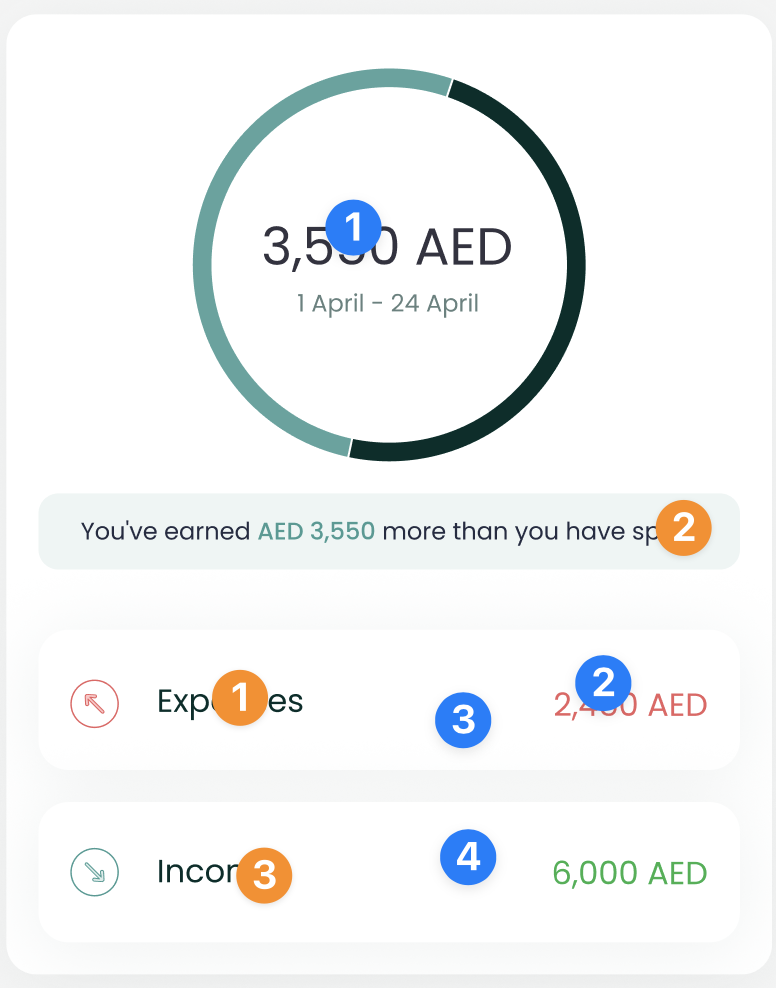
The CashflowComponent shows the user's gross expense and income over a period of time, along with the difference between them.

Usage
To use this view, just call the CashflowComponent method of your LuneSDKManager instance as shown in the example below.
CashflowView.kt
import io.lunedata.lunesdk.library.classes.LuneSDKManager

@Composable
fun CashflowView(
    luneSDK: LuneSDKManager
) {
    luneSDK.CashflowComponent()
}
To use this view in a project with Activities and Fragments, set the component property of your view to LuneView.CashflowComponent, as shown in the example below.
YourActivity.kt
override fun onCreate(savedInstanceState: Bundle?) {
    super.onCreate(savedInstanceState)

    // Grab our luneView and set the component property.
    val luneView = findViewById<LuneCompatManager>(R.id.luneLayout)
    luneView.component = LuneView.CashflowComponent
}
tip
You can now add an optional argument to the CashflowViewParams(view) parameter if you need to render a custom view as the footer of the screen.
Here is a simple example with a list of cards.
lunekit = LuneSDKManager(
    baseUrl = ClientApi.baseURl ?: "",
    token?: "",
)

val luneView = findViewById<LuneCompatManager>(R.id.luneLayout)
val view = layoutInflater.inflate(R.layout.layout_recycle, null, false)

val recyclerview = view.findViewById<RecyclerView>(R.id.list_item)
val viewAll = view.findViewById<TextView>(R.id.tv_viewAll)

viewAll.setOnClickListener {
    Toast.makeText(this, "View All Click Action", Toast.LENGTH_LONG).show()
}

recyclerview.layoutManager = LinearLayoutManager(this, RecyclerView.HORIZONTAL, false)

val data = ArrayList<String>()
for (i in 1..20) {
    data.add("Item $i")
}

val adapter = CustomAdapter(data)
recyclerview.adapter = adapter

luneView.manager = lunekit
luneView.component = LuneView.CashflowComponent
luneView.data =  CashflowViewParams(view)
Localization Keys and Analytics Tags
Analytics Tags Localization Keys
 | Analytics Tags
Localization Keys
|