


.svg)
.svg)
.svg)


.svg)

.svg)

.svg)
.svg)
.svg)
.svg)


.svg)
Expense Component
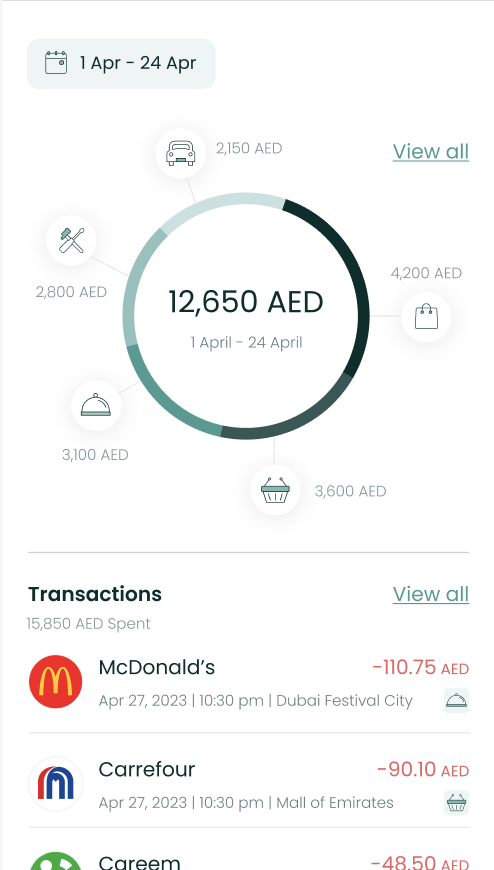
The ExpenseComponent shows the user's spend across categories in a neat donut chart, along with a list of recent transactions. Users are able to view data for previous months easily too.
To use this view, just call the ExpenseComponent method of your LuneSDKManager instance as shown in the example below.
// ExpenseView.kt

import io.lunedata.lunesdk.library.classes.LuneSDKManager

@Composable
fun ExpenseView(
    luneSDK: LuneSDKManager
) {
    luneSDK.ExpenseComponent()
}
To use this view in a project with Activities and Fragments, set the component property of your view to LuneView.ExpenseComponent, as shown in the example below.
// YourActivity.kt

override fun onCreate(savedInstanceState: Bundle?) {
    super.onCreate(savedInstanceState)

    // Grab our luneView and set the component property.
    val luneView = findViewById<LuneCompatManager>(R.id.luneLayout)
    luneView.component = LuneView.ExpenseComponent
}
✨ You can now add an optional argument to the ExpenseViewParams(view) parameter if you need to render a custom view between the chart and the transaction list.
Here is a simple example with a list of cards.
            lunekit = LuneSDKManager(
                baseUrl = ClientApi.baseURl ?: "",
                token?: "",
            )


            val luneView = findViewById<LuneCompatManager>(R.id.luneLayout)

            val view = layoutInflater.inflate(R.layout.layout_recycle, null, false)

            val recyclerview = view.findViewById<RecyclerView>(R.id.list_item)
            val viewAll = view.findViewById<TextView>(R.id.tv_viewAll)

            viewAll.setOnClickListener {
                Toast.makeText(this, "View All Click Action", Toast.LENGTH_LONG).show()
            }

            recyclerview.layoutManager = LinearLayoutManager(this, RecyclerView.HORIZONTAL, false)

            val data = ArrayList<String>()
            for (i in 1..20) {
                data.add("Item $i")
            }

            val adapter = CustomAdapter(data)
            recyclerview.adapter = adapter

            luneView.manager = lunekit
            luneView.component = LuneView.ExpenseComponent
            luneView.data =  ExpenseViewParams(view)
Localization Keys and Analytics
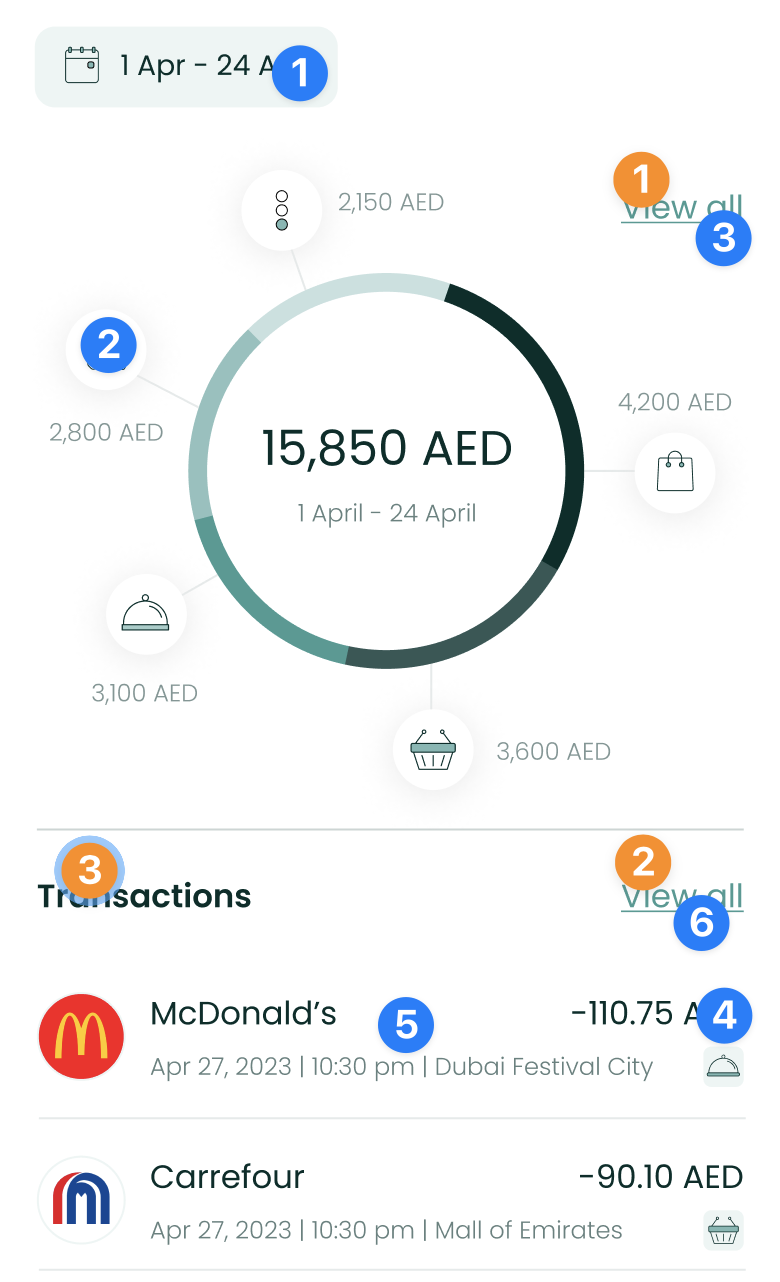
📊 Analytics Tags
date_picker_buttonchart_iconchart_view_alltransaction_amounttransaction_tiletransactions_view_all
🈯️ Localization Keys
lune_sdk_str_view_alllune_sdk_str_view_alllune_sdk_str_transactions
.png)
📊 Analytics Tags
date_picker_buttontrends_buttoncategory_tilecategory_amountavg_spend_sort_buttonname_sort_button
🈯️ Localization Keys
lune_sdk_str_all_spendslune_sdk_str_namelune_sdk_str_avg_spendlune_sdk_str_transactionslune_sdk_str_trends

.svg)